Go-Git - Version Control System from Scratch
Go-Git - Version Control System from Scratch
Go-Git is a Git implementation built from first principles in Go to understand how distributed version control actually works. No libraries for Git operations - just hash-based storage, tree structures, and commit graphs.
Why I Built This
Most developers use Git daily without understanding how it works internally. I built this to learn version control from the ground up - content-addressable storage, tree building algorithms, and commit graph traversal.
Core Features
- Content-Addressable Storage: Files stored by SHA-256 hash with automatic deduplication
- Staging Area: Git's three-tree architecture with index file
- Tree Objects: Nested directory structures as tree objects
- Commit History: Full commit chain with parent references
- Compression: zlib compression for all objects (blobs, trees, commits)
- Config Management: User name/email stored in .git/config
Commands in Action
Initialize Repository
go-git init
Creates the .git directory structure with objects, refs, and HEAD pointer.
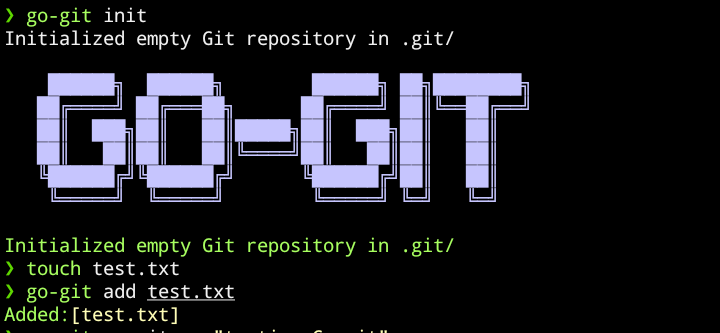
What happens: Sets up .git/objects/ for content storage, .git/refs/heads/ for branch pointers, and HEAD pointing to main branch.
Configure User Identity
go-git config
Stores your name and email in .git/config for commit authorship.
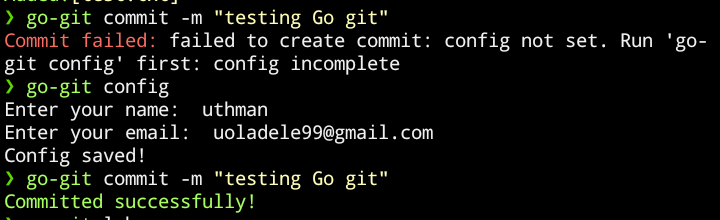
What happens: Prompts for user name and email, then writes them to .git/config in INI format. Every commit will include this information in the author field.
View Commit History
go-git log
Displays commit history by traversing parent references.

What happens: Reads commit hash from HEAD → refs/heads/main, loads commit object, displays info, follows parent pointer, repeats until no parent exists.
Get Help
go-git help
Shows available commands and usage information.
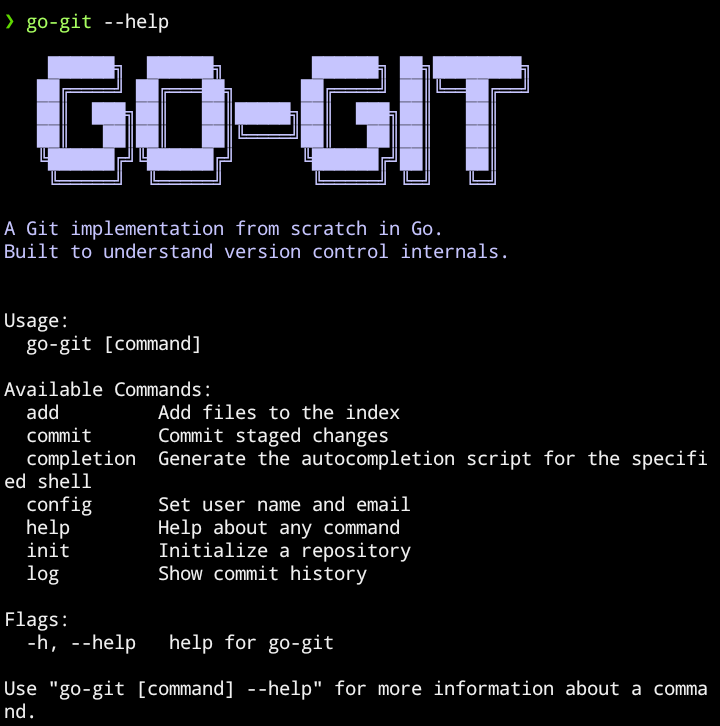
What happens: Displays CLI help menu with all available commands and their descriptions.
Complete Command Reference
go-git init                    # Initialize repository
go-git config                  # Set user name and email
go-git add <files>             # Stage files (supports directories)
go-git commit -m "message"     # Create commit
go-git log                     # View commit history
How It Works
Content-Addressable Storage
Every object is stored by its SHA-256 hash at .git/objects/ab/c123... where the first 2 characters are the directory and the rest is the filename.
Same content = same hash = automatic deduplication. Store the same file 100 times, uses disk space once.
Tree Building (The Hard Part)
Files are stored as blobs. Directories are stored as trees.
Trees must be built bottom-up (deepest first) because parent trees need their children's hashes. This was the hardest part to implement - understanding why trees reference other trees by hash, not by content.
Commits
A commit is a pointer to a tree plus metadata (author, timestamp, message, parent). Commits form a directed acyclic graph where each commit references its parent, creating the history chain.
Technical Implementation
- Object Format:
<type> <size>\0<content> - Tree Format:
<mode> <filename>\0<binary-hash>(mode: 100644 for files, 040000 for dirs) - Hash Storage: Binary bytes in tree objects, not hex strings (critical detail that took hours to debug). Note: .git/refs/heads/main stores hash as plain text hex string for simplicity
- Compression: zlib for all objects
- Branch Pointers: .git/refs/heads/main contains current commit hash
Performance
- Deduplication: Identical files stored once
- Compression: ~60-70% size reduction with zlib
- Scalability: Linear time for add/commit operations
Not optimized for speed (built for learning) but functional for small-to-medium repos.
What I Learned
- Content-addressable storage is elegant: hash = address, automatic deduplication
- Trees are graphs, not nested structures: they reference by hash, not content
- Building bottom-up is necessary: can't hash parent without child hashes
- Binary formats are tricky: working with null bytes and binary hash data
- Compression matters: without zlib, .git/objects would be 3-4x larger
Project Structure
go-git/
├── cmd/cmd.go              # CLI with Cobra
├── internals/
│   ├── init.go             # Repository initialization
│   ├── config.go           # User configuration
│   ├── hash.go             # SHA-256 + zlib compression
│   ├── log.go              # Commit history traversal
│   ├── index/index.go      # Staging area management
│   └── objects/
│       ├── blobs.go        # File content hashing
│       ├── trees.go        # Directory tree building
│       └── commit.go       # Commit object creation
├── install.sh              # Installation script
└── main.go                 # Entry point
Installation
git clone https://github.com/codetesla51/go-git.git
cd go-git
./install.sh

# Or build manually:
go build -buildvcs=false -o go-git
ln -s $(pwd)/go-git ~/.local/bin/go-git
Limitations
This is a learning project, not production software:
- No branches (only main branch)
- No merge operations
- No diff functionality
- No status command
- No remote operations (push/pull/fetch)
- No .gitignore support
- No packed objects (each object is separate file)
- No index optimization (linear scan)
Why these limitations exist: This project focuses on Git's core - the object model, staging, and commits. Adding branches/merging/remotes would be another 2-3x the code and shift focus from fundamentals to features.
Why This Matters
Building Git from scratch reveals:
- Why commits are cheap (just pointers to trees)
- How deduplication works (content-addressable storage)
- Why branching is fast (just moving a pointer)
- What "detached HEAD" actually means
- How merge conflicts arise (competing tree references)
The best way to understand a tool is to build it yourself. This project taught me more about Git in a week than years of using it did.
Built With
- Go 1.25 - Core language
- Cobra - CLI framework
- fatih/color - Terminal colors
- Standard library only - All Git logic hand-written
No Git libraries used. Everything from hashing to object storage is custom implementation.
Built by Uthman | @codetesla51
Learning project focused on understanding version control internals