GO-CHAT - Concurrent Terminal Chat Server
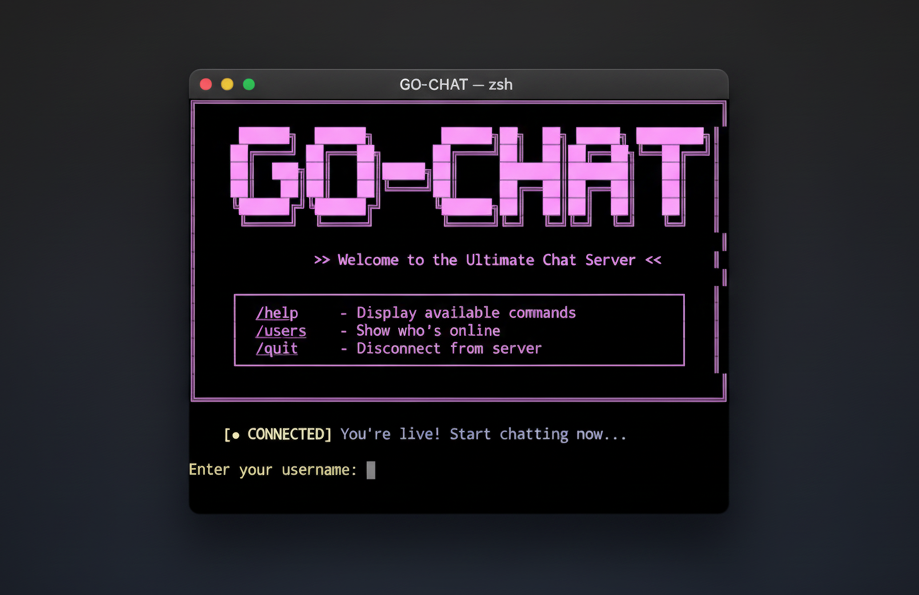
GO-CHAT - Concurrent Terminal Chat Server
GO-CHAT is a real-time terminal-based chat server built in Go. Features multiple chat rooms, AI assistant integration, private messaging, user profiles, TLS encryption, and rate limiting. Built to explore concurrent programming and network protocols.
Why I Built This
I built GO-CHAT to understand concurrent programming, TCP networking, and real-time messaging systems from first principles. This project explores Go's goroutine model, connection management, and AI integration in a production-style chat system.
Core Features
- Real-time Messaging: Instant message delivery using Go's concurrency model
- Multiple Lobbies: Create public or password-protected chat rooms
- AI Assistant: Integrated Gemini AI with context-aware responses
- Private Messaging: Direct messages and user tagging
- User Profiles: 50+ customizable emoji profile pictures
- Rate Limiting: IP-based connection limits and message throttling
- TLS/SSL Support: Optional encrypted connections
- Message History: Replay recent messages when joining lobbies
Performance
- Concurrent Connections: Tested with 100+ simultaneous users
- Memory Usage: ~50MB baseline, ~10KB per connected client
- CPU Usage: Minimal under normal chat loads
- Message Throughput: Suitable for real-time conversation
Note: Learning/hobby project suitable for small to medium deployments (teams, communities, personal use).
Quick Start
git clone https://github.com/codetesla51/go-chat-server
cd go-chat
go mod download
go build -o go-chat main.go
./go-chat
Connecting
# Using netcat (simple)
nc localhost 8080

# Using rlwrap (recommended - prevents message interruption)
rlwrap nc localhost 8080

# Using TLS (if enabled)
openssl s_client -connect localhost:8443
Key Commands
/help                             Show all commands
/lobbies                          List available chat rooms
/create <name> [password] <desc>  Create new lobby
/join <name> [password]           Join a lobby
/users                            Show users in current lobby
/sp <name>                        Set profile picture
/msg <user> <message>             Send private message
/tag <user> <message>             Tag someone in lobby
/ai <question>                    Ask AI assistant
/quit                             Disconnect
Features Explained
Lobbies (Chat Rooms)
# Create public lobby
/create gaming no-pass Discussion about video games

# Create private lobby
/create secret mypass123 Private discussion

# Join lobby
/join gaming
/join secret mypass123
Each lobby maintains its own message history and can have custom AI personalities.
AI Integration
Context-aware AI assistant that remembers lobby conversation history:
/ai What are goroutines in Go?
Setup: Get API key from Google AI Studio, add to .env file:
GEMINI_API_KEY="your-key-here"
User Profiles
/sp list            View available profiles
/sp robot           Set profile picture
/sp default         Reset to default
50+ emoji options: cat, dog, robot, ninja, fire, star, and more.
Private Messaging
/msg bob Hey, want to join the coding lobby?
/tag alice Check out this cool feature!
Rate Limiting
- Connection Limits: Maximum 10 connections per IP
- Message Limits: Maximum 5 messages per 10-second window
Architecture
Project Structure
go-chat/
├── main.go                    Server entry point
├── server/
│   ├── server.go             Core server logic
│   ├── ai/
│   │   ├── client.go         AI implementation
│   │   └── prompts.go        AI personalities
│   ├── handlers/
│   │   ├── client_manager.go    Connection management
│   │   ├── lobby_manager.go     Room management
│   │   ├── commands.go          Command processing
│   │   └── messaging.go         Message routing
│   ├── middleware/
│   │   └── rate_limit.go        Rate limiting
│   └── utils/
│       ├── colors.go            ANSI colors
│       └── formatting.go        Message formatting
└── go.mod
Connection Flow
- Client connects via TCP/TLS
- IP-based connection limit check
- Username selection and validation
- Client registered in ClientManager
- Placed in "general" lobby
- Recent message history sent
- Message loop begins
Message Flow
- Client sends text
- Command check (starts with /)
- Rate limit validation
- Message stored in lobby history
- Broadcast to all lobby members
- Format with timestamp and profile
Security Features
- TLS/SSL Support: Optional encrypted connections
- Password Protection: Hashed passwords for private lobbies
- Rate Limiting: Prevent spam and abuse
- Input Validation: Username and message sanitization
- Connection Limits: IP-based restrictions
Enabling TLS
openssl req -x509 -newkey rsa:4096 -keyout server.key \
  -out server.crt -days 365 -nodes
Place server.crt and server.key in project root and restart.
What I Learned
- Building concurrent TCP servers with goroutines
- Managing client connections and state safely
- Implementing real-time message broadcasting
- Rate limiting and abuse prevention
- TLS/SSL integration in Go
- AI API integration with context management
- Terminal UI design with ANSI colors
- Graceful shutdown and cleanup
Testing
go test ./...
go test -cover ./...
go test ./server/middleware/
go test ./server/ai/
Configuration
Environment Variables
Create .env file:
GEMINI_API_KEY="your-api-key"
Server Ports
- TCP: Port 8080 (default)
- TLS: Port 8443 (when enabled)
Example Session
$ rlwrap nc localhost 8080

  ██████╗  ██████╗        ██████╗██╗  ██╗ █████╗ ████████╗
 ██╔════╝ ██╔═══██╗      ██╔════╝██║  ██║██╔══██╗╚══██╔══╝
 ██║  ███╗██║   ██║█████╗██║     ███████║███████║   ██║
 ██║   ██║██║   ██║╚════╝██║     ██╔══██║██╔══██║   ██║
 ╚██████╔╝╚██████╔╝      ╚██████╗██║  ██║██║  ██║   ██║
  ╚═════╝  ╚═════╝        ╚═════╝╚═╝  ╚═╝╚═╝  ╚═╝   ╚═╝

Enter your username: alice

[LOBBY] alice has joined the lobby

> Hello everyone!

[@_@] alice [just now]
  ╰-> Hello everyone!

> /sp cat

Profile picture changed to: (=^・^=)

> /ai What are goroutines?

[AI Response to alice]
Goroutines are lightweight threads in Go...
Limitations
- Learning project, not for massive scale
- No message persistence (in-memory only)
- No user authentication system
- Terminal-based only (no web interface)
- AI requires external API (Gemini)
Built With
- golang.org/x/crypto: Password hashing and TLS
- godotenv: Environment variable management
- Google Gemini API: AI capabilities
Built by Uthman | @codetesla51