Rice, Rice Baby
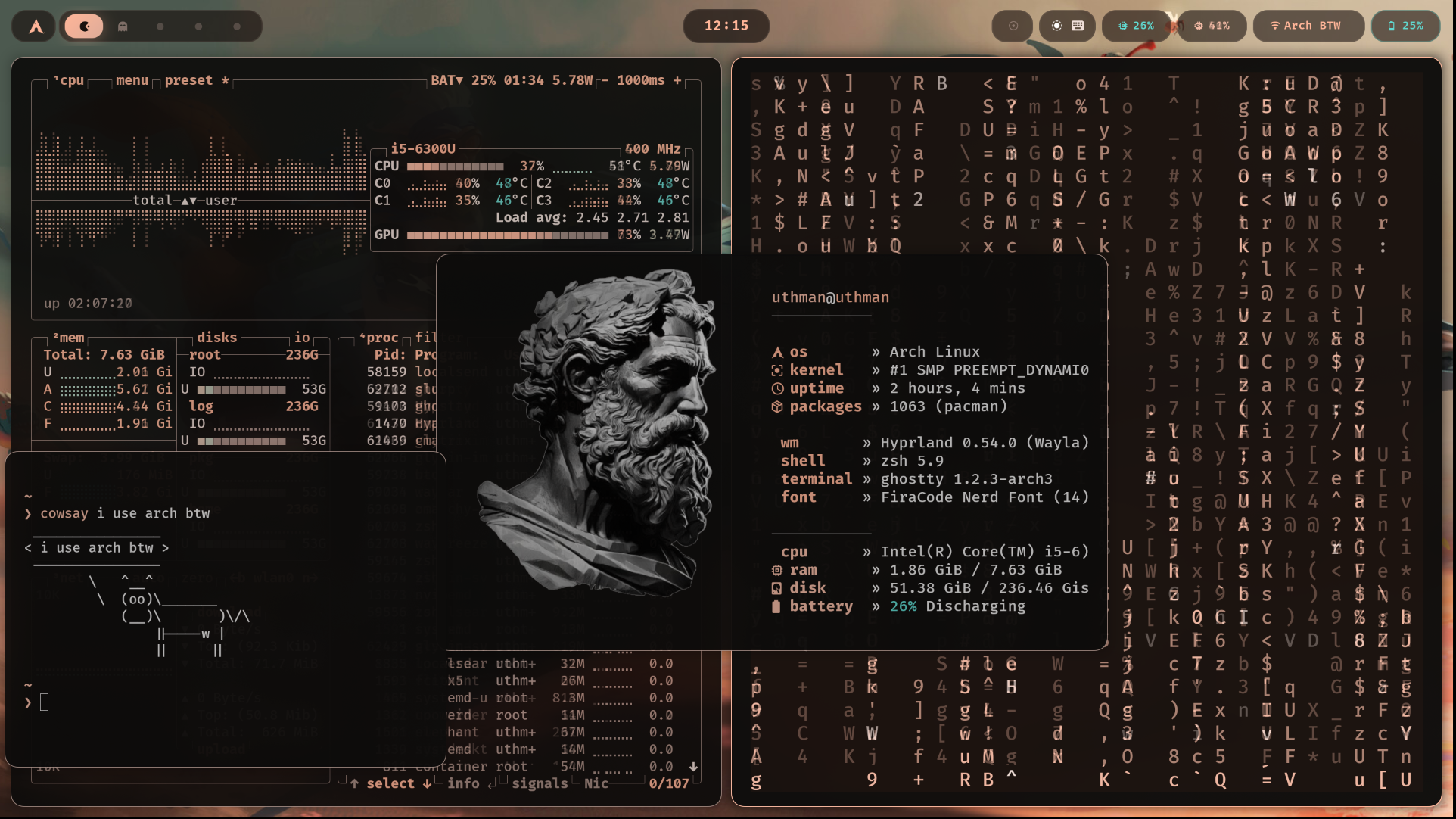
Let's get one thing out of the way: I did not install Arch the hard way. No manual partitioning at 2am, no pacstrap marathon, no crying over a botched bootloader. I used Omarchy — a preconfigured Arch + Hyprland setup that hands you a fully working desktop out of the box.
Was that cheating? Maybe. Did I care? Not even a little. I didn't want to spend a week fighting my OS before I could even open a terminal. I wanted to get set up and start building. So I took the shortcut, got a working system in minutes, and then immediately started tearing it apart and rebuilding it in my own image.
Because here's the thing about Omarchy: it's a great starting point, not a finish line. The second I had a working desktop, I was in the config files, ripping out defaults and replacing them with my own stack.
What I ended up with
Here's the current lineup:
- WM: Hyprland (Wayland)
- Bar: Waybar, done up as glassmorphic floating islands
- Terminal: Ghostty
- Shell: Zsh + Starship prompt
- Theming: Matugen (Material You color extraction)
- Notifications: SwayNC
- Launcher: Walker
- Visualizer: Cava
- System monitor: btop
- Fetch: Fastfetch
Individually, none of these are exotic choices. Together, they turn into a desktop that actually feels like mine instead of a screenshot I copied off r/unixporn.
The fun part: it changes color on its own
The centerpiece of the whole setup is Matugen. Drop in a wallpaper, run one command, and it extracts a full Material You color palette straight from the image — then pushes those colors out to every app on my system through templates. Terminal, bar, lock screen, notifications, system monitor, visualizer, launcher, even GTK and the browser — all of it repaints itself to match.
So the workflow is genuinely just:
matugen image ~/Pictures/your-wallpaper.jpg
New wallpaper, new mood, zero manual recoloring. It's the closest thing to a desktop with a personality that I've used.
Why rice like this at all
Two words: minimalism and control.
I like a desktop that stays out of my way — no clutter, no bloated widgets, nothing fighting for attention while I'm trying to focus. But minimalism without control just means "whatever the defaults gave me, but smaller." That's not the goal. I want every piece — the bar, the lock screen, the colors, the fonts — to be something I chose on purpose, not something that shipped that way.
Omarchy gave me the fast start. Everything after that — Hyprland tweaks, Waybar layout, Matugen wiring, dotfiles managed with Stow — is me deciding exactly what "minimal" means on my machine.
Try it yourself
The full setup, install script, and templates are on GitHub: uthman_dotfiles.
If you're an Arch user who wants a rice that looks intentional but doesn't fight you every time you change your wallpaper, clone it, run the installer, and go find a wallpaper you like. The rest takes care of itself.